Grok Bot, CopilotKit OpenBot and Hermes Agent can all take a job, use tools and return with completed work. The similarity stops there. One is a managed service, one is a self-hosted governance platform and one is a portable agent runtime.
Grok Bot is xAI's managed teammate product. OpenBot is an open-source platform that gives each agent a governed computer and an action audit trail. Hermes Agent is an open-source, provider-agnostic runtime for autonomous agents across terminals, messaging platforms and IDEs.
Choose Grok Bot when you want the product and cloud computer supplied for you. Choose OpenBot when you need a visible policy gateway in your own infrastructure. Choose Hermes when your team wants to operate the runtime, models and tools itself.
Checked against the makers' current documentation on 31 August 2026. Product access, commands and maturity can move quickly, so recheck the linked primary source before a production rollout.
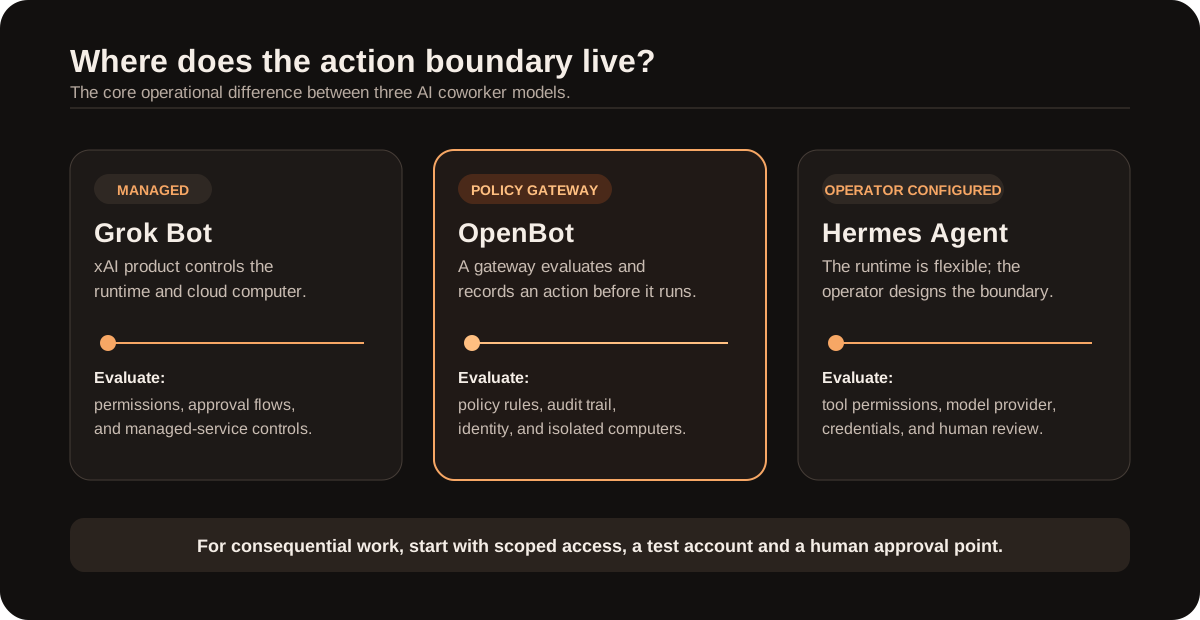
The useful comparison is not a model score. It is who owns the boundary between an agent deciding to act and an action happening.
The short answer
| If the priority is... | Start by evaluating... | Why |
|---|---|---|
| Giving work to a ready-made cloud teammate with minimal infrastructure work | Grok Bot | xAI provides the managed product, cloud computer and end-to-end task experience. |
| Running AI coworkers in your own infrastructure with explicit per-action policy and audit controls | OpenBot | The platform is designed around a gateway that decides and records browser, file, MCP and component actions before they occur. |
| Building a persistent autonomous agent with freedom to choose models, providers and operating surfaces | Hermes Agent | Hermes runs as an agent framework across terminal, messaging and IDE environments and supports multiple model providers. |
What is actually being compared?
All three can sit behind an "AI coworker" experience, but their product boundaries differ.
Grok Bot: a managed cloud teammate
xAI launched Grok Bot in early beta as a team of always-on agents with their own cloud computer. According to xAI, a Bot can sign into the tools a team already uses, work across apps, inboxes and websites, complete an assigned job end to end and return when approval is needed. xAI also says Bots can retain conversation context and learn working preferences over time. xAI: Introducing Grok Bot
This is the shortest route to a ready-made AI colleague. A user delegates work through the product instead of assembling the runtime, browser environment and integrations. xAI controls the service, its runtime and its availability. The launch documentation labels Grok Bot as early beta.
OpenBot: a self-hosted platform with a policy gateway
OpenBot is an MIT-licensed, open-source project from CopilotKit. It gives each coworker its own browser, files and tools, lets teams bring an agent that speaks AG-UI, and runs in the organisation's own infrastructure. Its documentation says every computer, file, MCP or component action goes through one gateway. The gateway resolves the target, evaluates policy and records an audit row before it allows or refuses the action. CopilotKit OpenBot repository
OpenBot is not simply an agent chat UI. Its documented boundary is the governed action. It also supports one computer container per Bot, configurable policies, encrypted stored credentials and an admin audit interface. The project is marked alpha and under active development. Treat it as software to validate, not as a finished enterprise service.
Hermes Agent: a provider-agnostic autonomous runtime
Hermes Agent is Nous Research's open-source autonomous agent framework. Its documentation describes one agent core that can run in a CLI, messaging gateway, TUI and desktop or IDE integrations. It can use tools, persistent memory, skills, delegation and scheduled work. It also supports multiple LLM providers. Hermes Agent documentation Hermes Agent repository
Hermes sits closest to the runtime layer. Evaluate it when one agent core needs to work through a terminal, browser, remote environment or messaging channel. The operator chooses the model, permissions and infrastructure, and therefore owns the security design.
Where they differ in practice
| Dimension | Grok Bot | OpenBot | Hermes Agent |
|---|---|---|---|
| Product model | Managed xAI product | Open-source, self-hosted coworker platform | Open-source autonomous agent framework/runtime |
| Where the computer lives | xAI describes a cloud computer for Bots | One containerised computer, browser profile and workspace per Bot | Chosen by the operator: local, Docker, SSH or remote environment patterns |
| Agent/model choice | Native Grok Bot product | Bring any AG-UI agent; model/provider depends on that agent | Provider-agnostic; model and provider are selected by the operator |
| Action governance | Product returns for approval when needed, per xAI's description | Explicit documented gateway: policy decision and audit record before action | Configurable tools, permissions and runtime environment; controls must be designed by the operator |
| Audit posture | Product-level visibility and controls are managed by xAI | Admin audit view for permitted, refused and failed actions | Logging and controls depend on the selected deployment and tools |
| Maturity declared by the maker | Early beta | Alpha / active development | Open-source runtime; evaluate the release and deployment model you intend to run |
| Best first evaluation | A team that wants to delegate work quickly in a managed experience | A team that needs a visible, policy-led action boundary inside its own environment | A technical team that needs portable, multi-provider agent operations |
Who controls the action boundary?
All three can give an AI a browser and tools. The material question is what happens between the agent deciding to act and the action taking place.
- Grok Bot packages that operating model inside xAI's product. The customer evaluates the service's permissions, integrations and approval flows.
- OpenBot makes the action boundary a first-class part of the architecture. Its gateway receives the intended tool action, evaluates it against policy, writes an audit record and only then allows or refuses it. That is a strong design point for workflows that need a demonstrable control layer. OpenBot architecture and controls
- Hermes Agent provides the flexible agent core, but the organisation must deliberately set the environment, tool access, model provider, credentials and human approval gates. It is powerful precisely because it does not force one deployment shape.
For high-impact work, do not confuse "the agent asks nicely before doing something" with a technical control. Define least privilege, an approval point for consequential changes, a way to revoke access and an audit trail that the responsible team can review.
Installation and first safe test: the practical difference
There is no single setup guide for all three products. Grok Bot is a managed xAI product, whereas OpenBot and Hermes Agent are installed and operated by the team using them. The steps below separate official setup from the operational controls that should come before any production access.
Grok Bot: enrol and constrain the first task
xAI describes Grok Bot as an early-beta managed product, not a self-hosted package. That means there is no public Docker, CLI or source-install path to reproduce locally. The practical starting sequence is:
- Confirm that the relevant xAI plan and workspace have access to Grok Bot.
- Select one bounded task whose output can be reviewed quickly, such as research or a draft for approval.
- Connect only the account and tools needed for that task; do not start with unrestricted inbox, file-store or production access.
- Define the approval point before the Bot begins: what may it prepare, and what must a human approve?
- Review the completed task and the available product controls before widening the scope.
This is an evaluation sequence, not an xAI deployment manual. xAI controls the service runtime and availability. Read xAI's Grok Bot announcement and use-case guidance before connecting business systems.
OpenBot: local evaluation with an explicit action gateway
OpenBot's own quick start is a local, alpha-stage setup. It requires Docker, Bun 1.3+, a CopilotKit Intelligence project and licence, and a model credential. Its default development mode disables authentication, so it is suitable for a laptop evaluation. Do not expose that configuration to real users or sensitive systems. OpenBot requirements and quick start
-
Clone the official repository and enter it:
git clone https://github.com/CopilotKit/openbot.git cd openbot -
Create the local configuration file:
cp .env.example .env -
Authenticate the CopilotKit CLI, select the project and write the licence token to the existing
.envfile:npx --yes copilotkit@latest login npx --yes copilotkit@latest project select npx --yes copilotkit@latest license --write -
Add the required runtime values to
.env: the selected Intelligence runtime key, a model key for the example agent, and a uniqueKEY_ENCRYPTION_KEY. The project documentsopenssl rand -base64 32for generating the latter. Do not commit this file or paste credentials into agent prompts. -
Install dependencies and start the local stack:
bun install bash scripts/start.sh -
Open
http://localhost:3010, use a harmless browser task, then inspect/admin/auditand/admin/boundaries. Add a deny rule and repeat the same action to prove that the boundary refuses it. -
Before any shared deployment, replace the development no-auth mode with real authentication, keep computer services private, use test credentials, and review the project's current alpha status and security documentation.
Hermes Agent: install the runtime, then choose the provider and tools
Hermes documents separate paths for desktop and command-line installations. The native Windows installer and the shell installer for Linux, macOS or WSL2 are published in the official repository. Hermes installation guide
-
Install Hermes using one official route:
# Native Windows PowerShell
iex (irm https://hermes-agent.nousresearch.com/install.ps1)
# Linux, macOS or WSL2 curl -fsSL https://hermes-agent.nousresearch.com/install.sh | bash -
Choose the provider and initial tool configuration. Hermes documents either its full setup wizard or individual commands:
hermes setup # or configure separately hermes model hermes tools -
If the team uses Nous Portal,
hermes setup --portalstarts its OAuth flow and configures the selected Nous provider plus the Tool Gateway. This is optional; Hermes also supports configuring other providers. Nous Portal setup -
Run
hermes doctorbefore enabling browser, messaging or remote execution. Resolve the reported environment gaps first. -
Start with a profile that has no production write access. Enable only the one tool needed for the first workflow, review command approvals and validate the output before adding messaging, MCP servers or persistent credentials.
The installation commands come from Hermes documentation; the access restriction is an operational safety requirement, not a product claim.
When Grok Bot is the better fit
Grok Bot is the straightforward evaluation when the business wants to hand off real tasks without first operating its own agent platform. xAI positions it for work across apps, inboxes and websites, including tasks such as research, sales outreach, operations, marketing and bug reproduction. Grok Bot use cases
The strongest use case is a bounded workflow where a managed product is more valuable than custom infrastructure: preparing a daily briefing, researching an account, drafting work for review or completing a repeatable browser task with approval at the hand-off.
Do not use early-beta status as a reason to give it unrestricted access. Start with a narrow tool set and a workflow whose result can be reviewed quickly.
When OpenBot is the better fit
OpenBot is the stronger candidate when the business needs to own the deployment and make agent governance observable. Its design supports agents from different frameworks through AG-UI, isolated Bot computers, policy rules, a human "take the wheel" path and an audit log of permitted, refused and failed actions. OpenBot's documented architecture
This is relevant to internal workflows where browser actions, files, sensitive systems or MCP tools need a traceable decision boundary. The published project requires infrastructure, a model credential and CopilotKit Intelligence components. It is an implementation to validate, not a turnkey hosted SaaS product.
When Hermes Agent is the better fit
Hermes Agent fits teams that want the agent itself to remain portable. It can use different LLM providers, persist skills and memory, delegate work and run across terminal, messaging and IDE surfaces. That is useful when the same operating agent must work with a company's preferred model provider or when the workflow spans development, research and operational tasks.
Hermes is not a governance product in the same narrow sense as OpenBot's gateway. Its advantage is the flexible agent runtime. The operator can also give it too much authority. Start with a restricted environment, scoped credentials, explicit approval points and a reversible first task.
A sensible evaluation sequence
Avoid choosing a winner from a five-minute demo. Test one low-risk workflow through the same scorecard:
- Task completion: did the coworker produce the required outcome without hidden manual work?
- Approval behaviour: did it stop exactly where a human decision was required?
- Access boundary: could it read or change anything outside the agreed scope?
- Auditability: can the team reconstruct what it did, why and with which credentials?
- Operational burden: who owns errors, model changes, browser sessions, credentials and uptime?
- Exit path: can the workflow, context and integrations be withdrawn or moved without losing control?
Run the same task with a clean test account and no production write access at first. Only then expand the tools or automation window.
Bottom line
Grok Bot, OpenBot and Hermes Agent all make it possible to hand work to an AI coworker with a computer. Their difference is the operating model:
- Grok Bot is the managed xAI route: fast to evaluate, provider-operated and currently early beta.
- OpenBot is the self-hosted governance route: an open platform where each action is designed to pass a policy-and-audit gateway before it runs.
- Hermes Agent is the portable runtime route: open source, multi-provider and flexible across the places an autonomous agent can work.
Choose the one whose control model matches the task. The best deployment is not the most autonomous agent; it is the smallest permissioned system that can complete the job, show its work and hand authority back at the right time.